

{{API_HOST}}, so the same version can call a test endpoint in staging and the real one in prod.
They work in flow agents and single prompt agents. See Environments and releases for how versions move between environments.
Add an environment variable
1
Open the environments grid
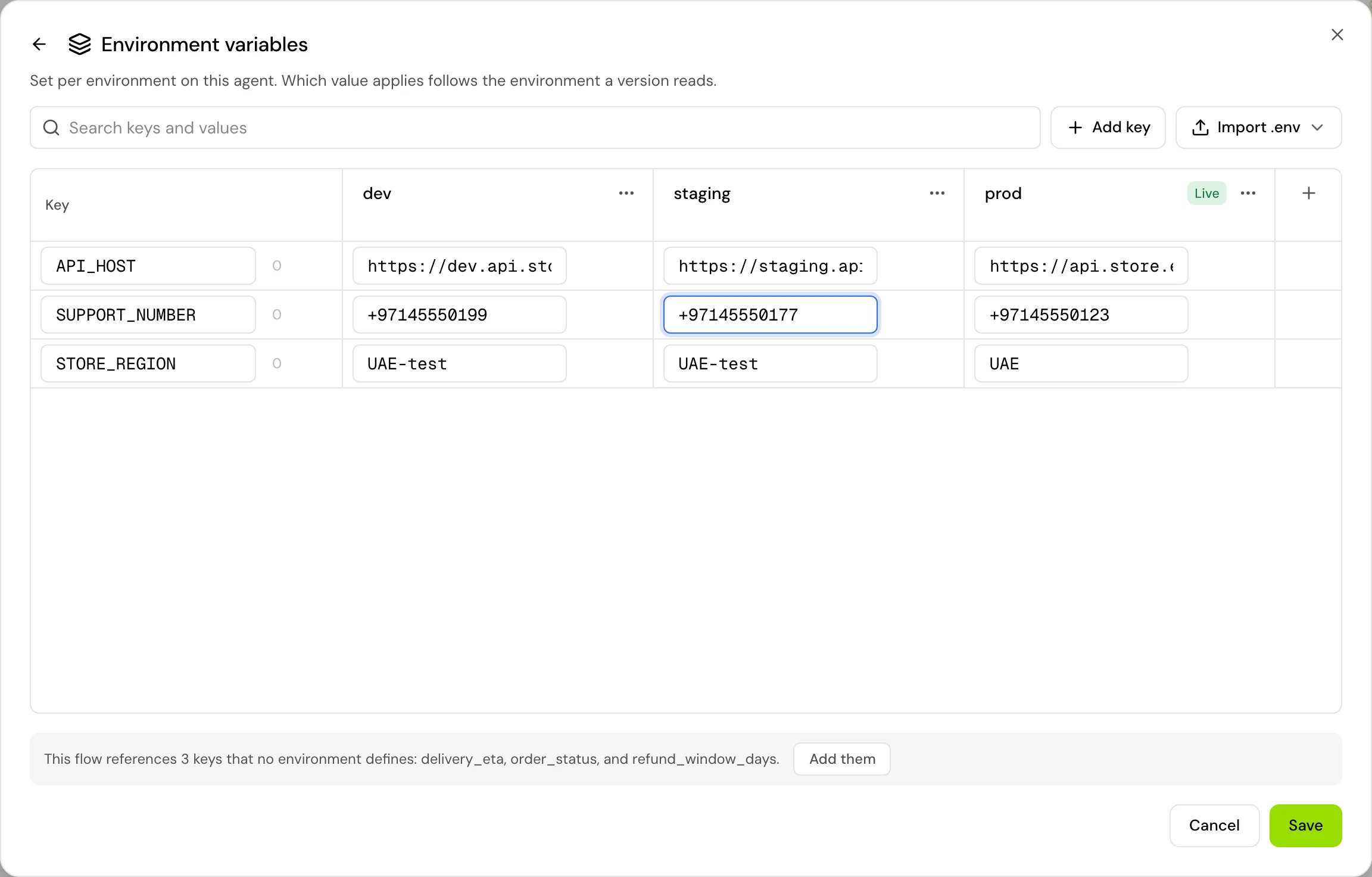
Open the Variables dialog (in a flow agent, Variables on the canvas toolbar; in a single prompt agent, Variables > Manage variables) and click Manage next to Environment variables.
2
Add a key
Click Add key and type the key in capital letters, for example
API_HOST.3
Fill in every environment
Type a value in the column for each environment. Use Copy to other environments to copy one value into the environments that have none.
4
Save
Click Save. If a cell is empty, saving is blocked: “Every key needs a value in every environment. Fill the cells marked in red.”
KEY=value per line into the environment you choose. To download one environment’s values, open that environment’s column menu and choose Export .env.
Key and value rules
Use an environment variable
Write the key in braces wherever variables work:{{API_HOST}} in an API tool’s URL, {{SUPPORT_NUMBER}} in a transfer step. The lowercase form, {{api_host}}, reads the same value.
Environment variables are available in every step, wherever the step is in the flow.
When a flow uses a key that no environment defines, the grid says “This flow references API_HOST, which no environment defines.” Click Add them to add the missing keys.
Which environment a call reads
The agent reads the values when the call starts. A change reaches the next call: “Calls in prod read it from the next call.” For prod: “Reaches live calls right away. No new version needed.”
Environment values outrank call-start values
When a value sent at call start inparams has the same name as an environment variable, the environment value wins. A caller can’t change your agent’s configuration by sending their own api_host.
This matters most for web calls, because anyone can see and change what a web page sends. Keep every setting the caller must not change in environment variables, and use dynamic variables for data that differs per call.
Environment variables and secrets
Put credentials (API keys, tokens, passwords) in Secrets, not in environment values. Reference a secret in a tool’s settings as{{secrets.NAME}}.
An environment value can’t hold a secret: a value that references one is never sent to calls, so the key reads empty everywhere, tools included. Reference the secret in the tool instead.
Write {{secrets.NAME}} only in tool settings, where the editor offers it. A secret written in a prompt or message would be filled in there too and sent to the model, where it could end up in the conversation.
Who can change values
Anyone in the project can see the values. To change them you need permission to edit the agent, plus the permission for that environment:
Owners and admins have all three. Without them you see: “Only people who put versions in an environment change its values. To try your own, use Test values in the Test menu.” See Roles and permissions.
Good to know
- Every agent has dev, staging and prod; they can’t be renamed or removed.
- An agent with deployments off has one environment as far as calls are concerned: prod.
- On a Transfer to agent, the receiving agent uses its own environment values, never the first agent’s.
- To try a new key or value without changing an environment, use test values. A new key added there joins dev when your changes are merged.
Related
Environments and releases
Promote versions between dev, staging and prod.
Test values
Try your own values in draft test calls.
Secrets
Store credentials for tools.
Pass values when a call starts
Per-call data from the API, SDK and batch calls.