

Make a step global
1
Open the step
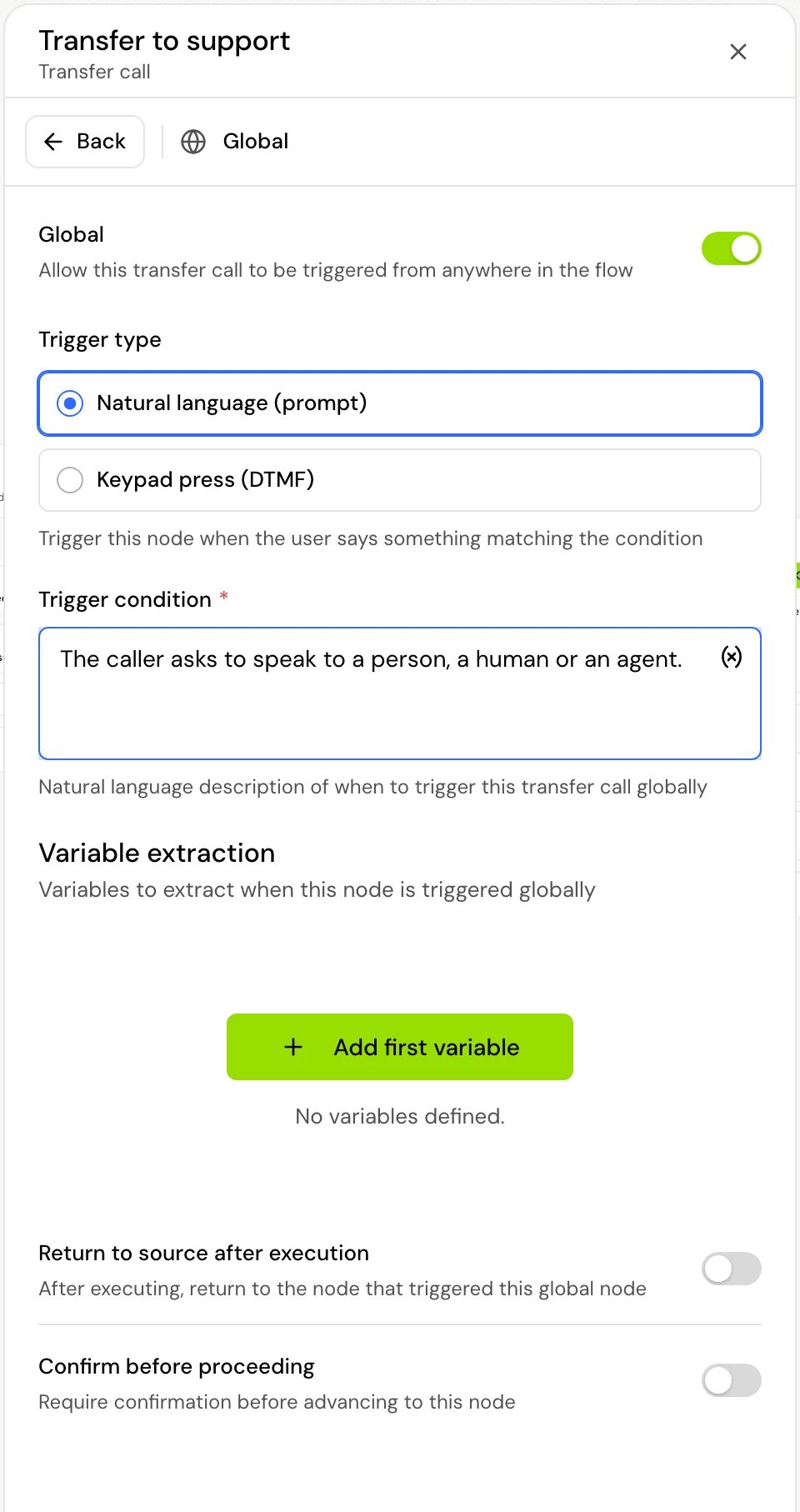
Click the step on the canvas and open its Global section.
2
Switch on Global
Turn on Global. Its description reads “Allow this … to be triggered from anywhere in the flow”, with the step type filled in.
3
Keep the trigger type on prompt
Under Trigger type, choose Natural language (prompt): “Trigger this node when the user says something matching the condition”.
4
Describe the trigger
In Trigger condition, describe what the caller says that should lead here. For example: “The caller asks to speak to a person, a human or an agent.” The field is required.
5
Optionally, collect values on the way
Under Variable extraction (“Variables to extract when this node is triggered globally”), add the variables the step needs, for example the reason for the call.
Trigger it with a key press
A global step can also be reached by a key on the caller’s phone, for example “press 0 to speak to someone” from anywhere in the call.- Under Trigger type, choose Keypad press (DTMF): “Trigger this node when the user presses a specific key on their phone”.
- In DTMF key (“Select which key press will trigger this node globally”), pick a key from 0 to 9,
*or#. A key that a step’s own transition already uses is marked “This key is already used in a transition”.
- Pressing the key during any step moves the call to this global step.
- A step’s own DTMF input transitions come first: if the step uses the same key, its transition wins.
- While a step is capturing digits (see Keypad input), keys are typed digits, not shortcuts.
- The model never moves to a keypad-triggered step on its own. Only prompt-triggered global steps are offered to it.
- Return to source works the same way: once the global step finishes, the call goes back to the step the caller was in.
How it works on a call
- While the call waits on a conversation step, every prompt-triggered global step (except the one the call is in) is offered to the model as a possible move, next to the step’s own prompt transitions. The model reads the Trigger condition to decide.
- When the caller says something that fits, the model takes the global step instead of answering in place. The values under Variable extraction are filled in from the conversation at that moment and saved before the global step runs.
- The current step’s own required variables don’t block the jump. A caller who is halfway through a booking can still ask for opening hours.
- After that, the global step runs like any other step and follows its own transitions, unless it returns to the caller’s step (below).
- If the flow has any global step, every conversation step waits for the caller, even one with no transitions of its own.
Return to the step the caller was in
With Global on, turn on Return to source after execution (“After executing, return to the node that triggered this global node”) when the global step is a detour, for example a Tool step that looks up opening hours. On a call, the global step runs, then the call goes back to the step the caller was in. It doesn’t play that step’s message again. If the global step is a Tool or Web tool step, the agent first tells the caller the result. Changing this setting opens Change return behavior and asks you to confirm:- Turning it on turns off the step’s transitions and removes its outgoing connections (the transitions themselves are kept). Its incoming connections are removed too, so the step can only be reached as a global step.
- Turning it off turns the transitions back on. Draw their connections again.
Ask the caller to confirm first
Confirm before proceeding (“Require confirmation before advancing to this node”) sits in the same Global section. It works on any step, global or not, except Start, Set local variables and Change agent settings. When the call is about to enter the step, the agent first repeats back what the caller asked for and waits for a clear yes or no.- On yes, the step runs.
- On no, the call goes back to the last conversation step the caller was in.
- It asks again on every visit.
Variables in global steps
A global step can be reached before the caller has given any details, so it can’t rely on values collected by earlier steps. Its texts (message, tool parameters, transfer message, phone number and the rest) may use only:- System variables
- Dynamic variables, passed when the call starts
- Environment variables
- The step’s own Variable extraction variables
Good to know
- Each global step is offered to the model on every conversation step. Keep trigger conditions specific and distinct from the prompt transitions in your flow, so the model doesn’t confuse them.
- Global steps are triggered by what the caller says. To react to a key press, add a DTMF input transition on each step where the key should work. See Keypad input.
Related
Transitions
How the model chooses between transitions and global steps.
Transfer call step
A common global step: hand the caller to a person.
Extract values from the conversation
How variables are collected from what the caller says.
Design tips
Advice for flows that hold up on real calls.